Pin It

Thursday, 12 June 2014

Dancing with Robots AR Style!


We had a great time with a new app called Pop Lock Bot.  It is an augmented reality app that lets the students dance with a robot!  IMG_0769

IMG_0746

We took pictures of each student posing with their new robot pal!

IMG_0678

Even the school staff wanted to get in on the act!

IMG_0591

Then we wrote stories about our robot pal! We wrote and we wrote and we wrote!

IMG_3209

Then we made special robots to display our robot stories!

IMG_3216

We also made an iMovie trailer using the robot pictures and the video we made of everyone dancing with the robots!  We attached the trigger picture to the movie trailer with the Aurasma app.  There is a trigger picture on each robot thanks to some help from one of my volunteer moms!  I sent home the trigger picture and the aura to each of my student's families via email.  

IMG_0786

IMG_0794

Dancing with robots is a lot of fun!


Space Travel AR Style!


We have been having a lot of fun with a variety of apps I have found about space.  This one has become a favourite!  It is another Augmented Reality app called Spacecraft 3D.  This is an app from NASA Jet Propulsion Laboratory and the California Institute of Technology.
IMG_0459
You download a marker and then place the iPad over the marker and this lovely 3D image appears.  The best part is that you can take your picture with it!  There are 13 different spacecraft that you can view including the Curiosity and Hubble telescope!
IMG_0461
There are animations and information about each of the spacecraft!
We had fun looking at the spacecraft and choosing which one we wanted to have a picture with.  The children then posed with the image and these are some of the cool results.
IMG_0462

We have been working on a space theme this month.  The children have been using  the iPads to create these awesome pages about space.
hayden marley space
I downloaded some neat space images from the internet onto the camera roll of the iPads.  Then I showed the children how to import the pictures from the camera roll into an app called Strip Designer.  It is one of my favorite apps.
austin garrett space
After that short demonstration I handed the iPads over to the children.
IMG_2835
They worked as partners and chose the pictures they wanted and placed them in the cells on the page. Then, with a little help, they added a text box describing the image.
IMG_2836
The children are fearless.  They pop in and out of the camera roll, sizing and re-sizing their pictures to fit the spaces and then deciding on the various options for captions and the accompanying text with ease.
I think the product looks amazing!  Grade One students can do a lot, can't they?
We took all the pages and put them together to create a book using the Explain Everything app! 


Then the students recorded the captions on each page and we saved the project to the camera roll.  I uploaded the video to Youtube and we can share it with everyone.  


I also attached the video using Aurasma to a creative writing project we did.  We used the pictures we created with each student using the Spacecraft 3D app. 

The pictures served as a spark for a creative writing exercise about a space trip!  They wrote and they wrote and they wrote!


While we were learning about the Curiosity spacecraft I found a cool NASA website that focused on the Mars expeditions.  There are a lot of cool links on the site including one that lets you send a postcard to the Curiosity spacecraft on Mars!  Too cool! Of course, we had to send a postcard!
IMG_0454

mars 1

mars 3

Another app we have had some fun with is called  Space Journey.  I love this app!  It lets you choose a planet and then see it in relation to its place in the solar system!
earth planet
You can pick from any of the planets in our solar system and then see it in space in relation to the other planets and the sun.  Of course we had to try them all!
saturn


planet 3
We got a little dizzy spinning around our solar system!  You can move the planet around and see what it sees around it!
We are having too much fun with all the space apps! And there are many more!

Snowman iPad Project


The snowmen project is one of my favorite projects.  The snowmen pictures were created at home as a family project!  Then at school, the children used a variety of apps to create a book on the iPads about on the wonderful snowmen they created with their families at home!

This year we have turned our iPad snowman project of each book into a movie which we have uploaded to our Youtube channel.  
The children used a variety of apps to create their project based on the wonderful snowmen they created with their families at home!  We used a combination of Doodle Buddy, using the camera on the iPad, and Explain Everything to create our projects!  

I made a special page on my classroom website to showcase them!


They worked very hard on them!


You can hear how proud they are in their voices!


Sunday, 23 March 2014

The Day the Dinosaurs Came to School - Augmented Reality Style!


We have been having way too much fun with the pictures we created using the Walking with Dinosaurs, iMovie and Aurasma apps!

We decided to make a movie trailer using iMovie using the pictures.

 
The children brainstormed the phrases to go with the pictures!  We voted on the best phrases and then put them in!
Then I created the trigger picture so we could send the movie trailer home!

But there is still more!  
The pictures were so awesome we used them to trigger a creative writing activity! 

We called it The Day the Dinosaurs Came to School! 

I printed off the pictures of each child with their dinosaur on my color printer at home.  Then I made up a writing sheet with the title The Day the Dinosaurs Came to School!

We looked at all the pictures together and brainstormed about the pictures and possible things that could happen if a dinosaur came to school! And we had the pictures as proof!   What fun!  Then the children started writing their stories!  We have some amazing stories!

I also placed the trigger for the aura we made on Aurasma on the writing page as well as a special bonus! The aura is linked to the iMovie trailer we made with the pictures.
I sent the aura link home to everyone in an email already but now the picture trigger is embedded in the creative writing that the children did as well!  You need the picture to trigger the Aura!

After the children finished working on their stories, we used the iPads to trigger the auras.
They all came running to see the first one! I have put the finished products out in the hallway for everyone to see.  The pictures alone are really cool and getting a lot of attention!  (So glad I found this app!) The stories are amazing and fun to read.
Adding the aura with the iMovie trailer we made with the dinosaur pictures adds a fun extra! 
 Sometimes, we have people who stop to look at the pictures and read the stories.  
Then if I can, I have them use my iPad and have them try our “secret code” trigger  picture as well.  They are always surprised to see a picture start an iMovie trailer!
 Way too much fun!  
Still working on another project with the dinosaur pictures on the iPads….
Takes a bit longer and still trying to figure out the best way to share them…..
Stay tuned!

Saturday, 15 February 2014

More Fun with Augmented Reality - Aurasma Style!

We have been continuing to experiment with Augmented Reality using the Aurasma app.  I have been playing with this app and it’s a lot of fun!  
I wanted to find a way to share a movie trailer that we made using the iMovie app about our Gingerbread house building activity we did with our buddy class in December.
Using the Aurasma app I was able to link a picture of a gingerbread house to the movie trailer.  By opening the Aurasma app and then opening the link that I sent via email I have been able to share the movie trailer.   I need to figure out how to use a channel, I think!  


We have been using the iPads at school to share this with our class and our buddy class as well.

It seems like magic anytime we use it!  I have linked an Explain Everything Video to it as well!
I have lots of ideas of how these apps could be used in the classroom and to share with parents!  Can't wait to experiment!

We have been continuing to have lots of fun with the CoLAR app.  They are seriously Too Much Fun! 


Seeing the bird pop up and eat a worm on the big screen is amazing!  
They really like having their picture taken with the animation!  You can have them color the picture and take their picture with them in it!  Lots of fun when you get them to pose with it!  
Hoping to send these out to my parents! 


Wednesday, 12 February 2014

Fun with Augmented Reality!


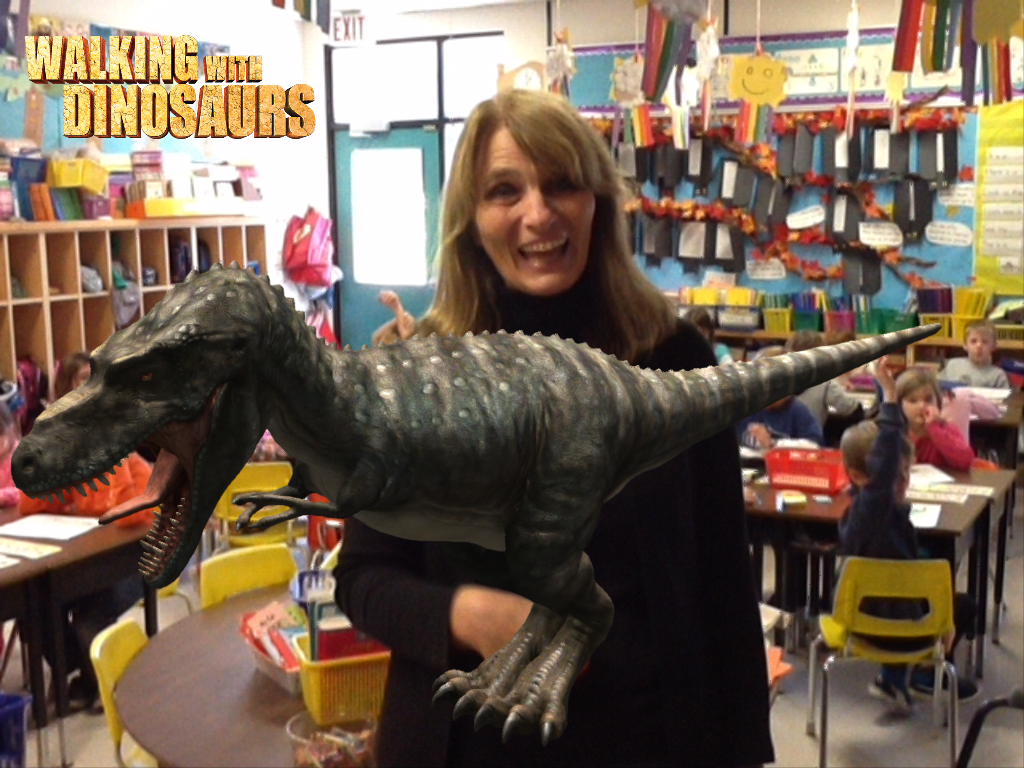
We have been having a lot of fun with a variety of Augmented Reality apps.  Walking with Dinosaurs is a favorite!  This is a great app that allows you to superimpose a dinosaur on a picture.


 Our principal petting a dinosaur!  
We had a lot of fun having the children pretend to pet, hold, or be afraid of a variety of dinosaurs.  We are using the pictures we created for a creative writing activity!  


Even my kitty cat got to meet a dinosaur! My students thought this was hilarious! 


Can you see the dinosaur crawling on her leg? If you aim the iPad at the trigger picture a dinosaur appears and begins walking around!  


You can feed it too and it comes marching over to eat! 


We have been having a great time with CoLAR app.  I managed to find some more free pictures to download and use.  We have taken to calling them the "magic" coloring pages!


If you press on the screen the ornaments cue different music! 


If you press on the fireworks they take off and fireworks appears!  We found this out by accident when one student touched the screen to try to figure out what was happening in the picture!  


Lots of fun!